---
title: How to Access Sleep Concierge Feature | Bryte
description: You can access Sleep Concierge through our app. Simply open the app, navigate to the Sleep Insights tab, select the Sleep Concierge floating icon, and you’ll find the Sleep Concierge feature ready to
---
[Skip to content](https://kb.bryte.com/knowledge/how-do-i-access-sleep-concierge#main-content)
English
Show submenu for translations
[Contact us](https://kb.bryte.com/knowledge/kb-tickets/new?hsLang=en)
![BryteLogo\_flat\_light-1.png\]](https://kb.bryte.com/hs-fs/hubfs/BryteLogo_flat_light-1.png?height=50&name=BryteLogo_flat_light-1.png)
Open main navigation
Close main navigation
- English
Show submenu for translations
- [Contact us](https://kb.bryte.com/knowledge/kb-tickets/new)
This is a search field with an auto-suggest feature attached.
- There are no suggestions because the search field is empty.
1. [Support](https://kb.bryte.com/knowledge?hsLang=en)
2. [Bryte Balance Signature](https://kb.bryte.com/knowledge/bryte-balance-signature?hsLang=en)
3. [Balance Bed App](https://kb.bryte.com/knowledge/bryte-balance-signature?hsLang=en#balance-bed-app)
# How to Access Sleep Concierge Feature | Bryte
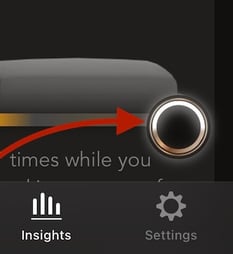
You can access Sleep Concierge through our app. Simply open the app, navigate to the Sleep Insights tab, select the Sleep Concierge floating icon, and you’ll find the Sleep Concierge feature ready to assist you.
- [Bryte Balance Signature](https://kb.bryte.com/knowledge/bryte-balance-signature?hsLang=en#main-content)
- [Balance Bed App](https://kb.bryte.com/knowledge/bryte-balance-signature?hsLang=en#balance-bed-app)
- [Setup and Troubleshooting](https://kb.bryte.com/knowledge/bryte-balance-signature?hsLang=en#setup-and-troubleshooting)
- [Owner's Manual](https://kb.bryte.com/knowledge/bryte-balance-signature?hsLang=en#owners-manual)
- [Sleep Concierge FAQs](https://kb.bryte.com/knowledge/bryte-balance-signature?hsLang=en#sleep-concierge-faqs)
- [Bryte Balance PRO Series](https://kb.bryte.com/knowledge/bryte-balance-pro-series?hsLang=en#main-content)
- [Advanced Personalization](https://kb.bryte.com/knowledge/bryte-balance-pro-series?hsLang=en#advanced-personalization)
- [For hotels](https://kb.bryte.com/knowledge/for-hotels?hsLang=en#main-content)
- [Bryte Balance](https://kb.bryte.com/knowledge/for-hotels?hsLang=en#bryte-balance)
- [FAQs](https://kb.bryte.com/knowledge/faqs?hsLang=en)
- [Advanced Personalization](https://kb.bryte.com/knowledge/advanced-personalization?hsLang=en)
- [Adjustable Base](https://kb.bryte.com/knowledge/adjustable-base?hsLang=en)
[](https://www.bryte.com/)
Copyright © 2026, Bryte